Forwarding ports to CSCT Cloud
Different services are hosted on specific ports on the server, for example the MySQL server accessed in a number of modules is available on port 3306. For security, these ports and services are not openly accessible from outside the server, and so to be able to access them we need to use port forwarding to securely pass traffic from your local computer to the service running on the server.
This process uses an SSH tunnel, which is created when you connect to the server using SSH, to securely send and receive data with the ports you've forwarded. You will only be able to access these ports on the server when you have an active SSH connection to it, either through Visual Studio Code or through a terminal session.
Using Visual Studio Code
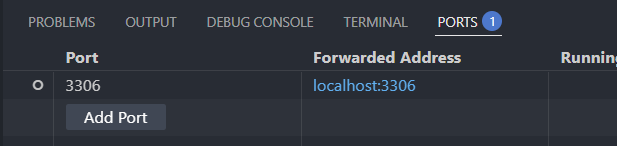
Access the Ports tab in the bottom pane:

If you can't see the ports tab, open it using the Command Palette (Ctrl+Shift+P or Cmd+Shift+P) and search forward a port:

In the Ports tab, press the Forward a Port button (or the Add Port button if you already have other ports forwarded). Type the port number in the Port number or address box - for MySQL you want to use 3306 - then press Enter to save:
Using SSH in a terminal
When connecting using the terminal, we can specify ports we want forwarded as arguments to the SSH connection command.
The -L flag is used to forward a port accessible on the server to a port on your local machine, using the format <local port>:<remote host>:<remote port>. Remote host in this case is from the perspective of the server, so we would use localhost for services running on CSCT Cloud itself, and would normally use the same number for the local port and remote port.
Example
To forward port 3306, used to access the MySQL server, we would add -L 3306:localhost:3306 to the connection string.
The full connection command would then be:
In your SSH configuration file
If you have your connection setup in an SSH configuration file, you can use the LocalForward directive to have ports forwarded everytime you connect.